


vThe platform you trade on shapes how you read the market, how quickly you can act, and what tools are within reach when a setup materializes. In that regard, choosing between MT4, MT5, cTrader, and TradingView is a workflow decision you’ll feel every session.
The problem is that you’ll find conflicting advice everywhere. Forum threads swear by MT4. YouTube videos push TradingView. Your broker defaults you to MT5. And cTrader keeps coming up just often enough to make you wonder what you’re missing.
This trading platform comparison cuts through that noise so you can learn which platform fits your trading style, your asset preferences, and your experience level, without stitching together answers from four different sources.
Why Your Choice of Trading Platform Actually Matters
Your platform determines which order types you can place, how many timeframes you can analyze, whether you can automate your strategies, and even which brokers are available to you. It’s the lens through which you interact with every market you touch.
Here’s a useful way to think about it: choosing a platform is like choosing a vehicle for a long road trip. A sedan, an SUV, a sports car, and a camper van will all get you from point A to point B, but the experience, capability, and comfort will vary wildly depending on the terrain. A forex scalper has completely different platform needs than a swing trader managing a multi-asset portfolio.
The real cost of choosing the wrong platform is the hours you pour into learning the interface, building chart templates, coding or installing indicators, and shaping your workflow around it. Switching later means starting that process from scratch. Getting this right early saves you more time than most traders realize.
Before you can compare, though, you need to understand what each platform was actually designed to do.
Quick Overview: What Each Platform Is Built For
MetaTrader 4 (MT4)
MT4 is the workhorse of retail forex trading. Released by MetaQuotes in 2005, it became the industry default and still holds that position with the widest broker support of any platform on this list. It was built primarily for forex, and that shows. The interface is straightforward, the charting is functional (if a bit dated), and the Expert Advisor (EA) ecosystem running on MQL4 is massive. If you’ve ever downloaded a free trading bot or custom indicator, chances are it was built for MT4.
What MT4 does well is simplicity and ubiquity. What it doesn’t do is evolve. Development has effectively stalled, and its feature set reflects a market that looked very different two decades ago.
MetaTrader 5 (MT5)
MT5 is MetaQuotes’ successor to MT4, but calling it “MT4 version 2” undersells the differences and overstates the similarities. MT5 was built from the ground up for multi-asset trading, covering forex, stocks, futures, and commodities under one roof. It offers more timeframes, more order types, a more powerful scripting language (MQL5), and an integrated economic calendar.
However, that broader scope comes with a steeper learning curve, and its EA ecosystem, while growing, isn’t directly compatible with MT4’s. You can’t drag your MT4 bots into MT5 and expect them to work.
cTrader
cTrader, developed by Spotware, positions itself as the transparency-focused alternative to the MetaTrader family. Its standout features include a genuinely modern interface, native depth of market (Level II pricing), detachable chart windows, and cBots for automation written in C#. For traders who value order execution transparency and a cleaner user experience, cTrader often feels like a welcome change after years on MetaTrader.
The trade-off is broker availability. Fewer brokers support cTrader compared to MT4 or MT5, which can limit your choices when it comes time to open an account.
TradingView
TradingView is a different animal entirely. It started as a charting and social analysis platform, not a trade execution tool. Its browser-based interface, Pine Script language, and community-driven indicator library have made it the go-to for technical analysis across virtually every asset class. In recent years, TradingView has added broker integration for trading directly from charts, but execution capabilities remain more limited than the dedicated platforms above.
If your priority is charting power, cross-market analysis, or learning from other traders’ published ideas, TradingView is hard to beat. If your priority is execution speed and granular order management, it’s a complement to your setup rather than the centerpiece.
So how do the two MetaTrader platforms actually compare head to head? Let’s get into the specifics.
MT4 vs MT5: Is It Worth Upgrading?
This is one of the most common questions in retail trading, and the answer isn’t as clean as “newer is better.” MT4 and MT5 share a name and a developer, but they serve different purposes. Here’s where they diverge.

Order Types and Execution
MT4 gives you four pending order types: buy limit, sell limit, buy stop, and sell stop. That covers most scenarios for forex traders. MT5 adds two more: buy stop limit and sell stop limit, which let you set conditional pending orders. These are particularly useful for breakout strategies where you want tighter control over your entry logic.
For most forex-only traders, MT4’s order types are sufficient. But if your strategies involve layered entries or conditional triggers, MT5’s additional options give you flexibility that MT4 simply can’t match.
Timeframes and Charting
MT4 offers 9 timeframes. MT5 offers 21. The additional timeframes (like 2-minute, 6-hour, or 8-hour charts) let you fine-tune your analysis without relying on custom indicator workarounds. If you’ve ever wanted a 2-hour chart on MT4 and had to jury-rig a solution, MT5 handles it natively.
Charting objects and built-in indicators are also more numerous on MT5, though the practical difference for most traders is modest. Both platforms support custom indicators, and MT4’s larger library of community-built tools partially compensates for its smaller native set.
Algorithmic Trading (EAs vs MQL5)
Here’s where the split gets serious. MT4 uses MQL4 for its Expert Advisors. MT5 uses MQL5. These are different languages with different syntax and capabilities. MQL5 supports object-oriented programming, multi-threaded strategy testing, and is generally more powerful for complex algorithmic strategies.
The counterweight is that MT4’s EA ecosystem is enormous. Thousands of free and paid EAs, indicators, and scripts exist for MQL4. MT5’s library is growing but hasn’t caught up. If you depend on specific MT4 tools, switching means either hunting for MT5 equivalents or having them rebuilt from scratch.
Asset Class Coverage
This is MT5’s clearest advantage. MT4 was designed for forex and CFDs. MT5 handles forex, stocks, futures, options, and commodities natively. If you want a single platform to trade across multiple markets, MT5 is the obvious pick. If you trade forex exclusively, this advantage won’t move the needle for you.
Verdict: Who Should Stay on MT4 and Who Should Move to MT5
Stay on MT4 if you trade forex only, rely on a library of MT4-specific EAs or indicators, and your broker supports it well. Move to MT5 if you want multi-asset coverage, need more timeframes, or are building new automated strategies from scratch and prefer the more capable language.
Neither platform is “better” in absolute terms. The right choice hinges on what you trade and what tools you’ve already invested time building around. But what if neither MetaTrader feels quite right? That’s where cTrader enters the picture.
cTrader vs MetaTrader: A Different Philosophy
cTrader isn’t trying to be a better MetaTrader. It’s trying to be a fundamentally different kind of platform, one built around transparency, modern design, and execution quality. For some traders, that philosophy clicks instantly. For others, it solves a problem they don’t actually have.
Interface and Usability
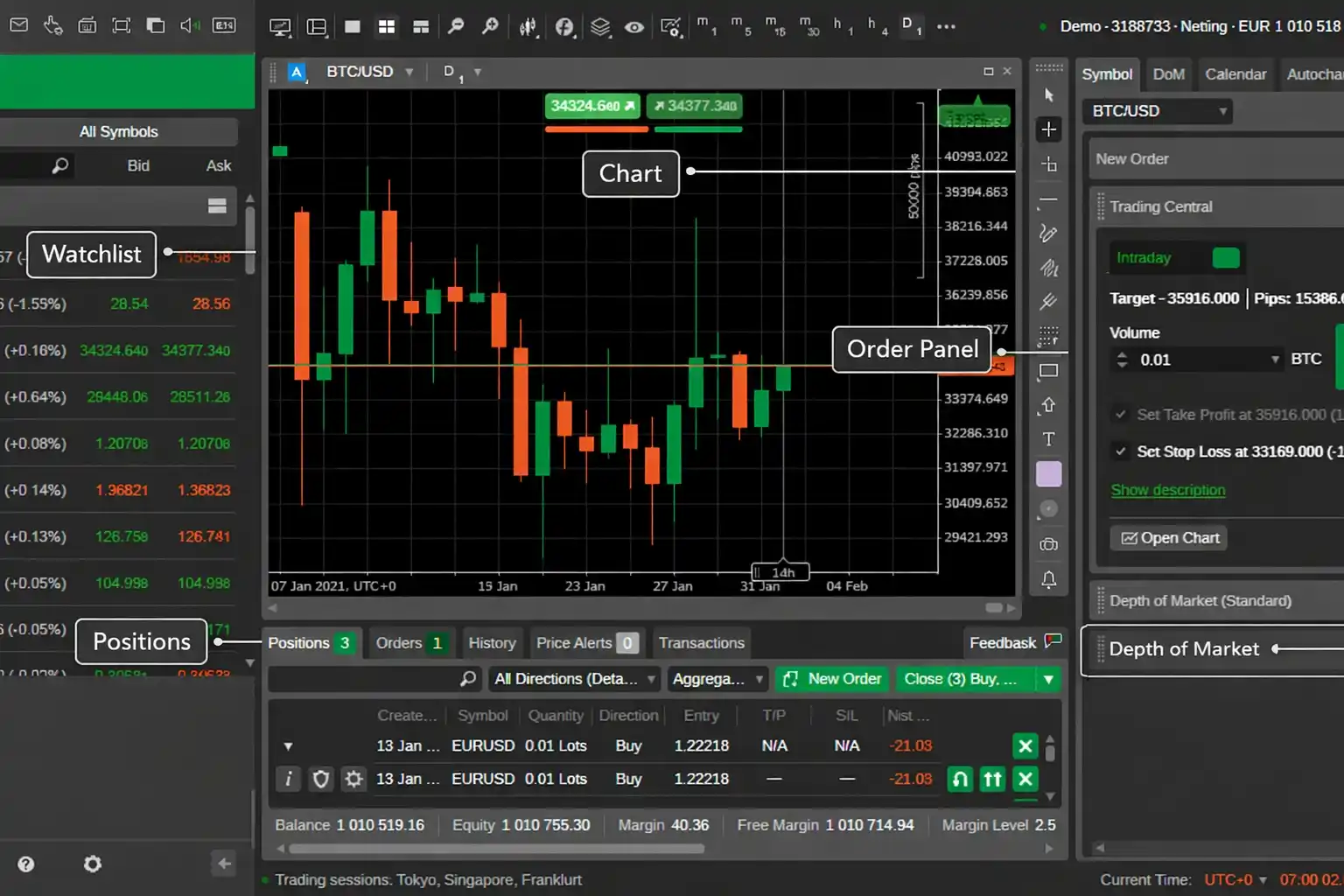
The first thing you’ll notice about cTrader is that it looks like software designed in this decade. The interface is cleaner, more intuitive, and more customizable than either MT4 or MT5. Charts are detachable, so you can drag them to separate monitors without clunky workarounds. The layout feels purpose-built for traders who actually use multiple screens.
MetaTrader’s interface, by comparison, is functional but showing its age. It works, but it doesn’t adapt to modern multi-monitor setups gracefully. If your workflow involves frequent visual chart comparison across screens, cTrader’s design gives you a noticeable edge in both comfort and speed.
Order Execution and Depth of Market
cTrader’s native depth of market (DOM) panel is one of its defining features. You can see live Level II pricing, place orders directly from the DOM, and get a clearer read on where liquidity sits. MT5 does offer a DOM, but it feels bolted on rather than baked in.
For traders who care about execution transparency, particularly scalpers and short-term traders, cTrader’s approach to order routing and pricing visibility is genuinely superior. You see more of what’s happening behind your orders, and that visibility can matter when milliseconds count.
Automation (cBots vs EAs)
cTrader uses C# for its automated trading bots (cBots) and custom indicators. If you have a programming background, C# is a more modern and widely used language compared to MQL4 or MQL5. The cTrader Automate environment is well-documented and integrates cleanly with the platform.
There’s a catch, though: the community of cBot developers and shared strategies is significantly smaller than the MetaTrader ecosystem. You won’t find the same volume of free, pre-built tools. If coding your own solutions is part of your skill set, cTrader’s automation environment is excellent. If you depend on a marketplace of ready-made bots, MetaTrader offers a much larger selection.
Broker Availability
This remains cTrader’s most significant limitation. While MT4 and MT5 are supported by hundreds of brokers worldwide, cTrader is available through a smaller (though steadily growing) list. Before committing to cTrader, verify that a broker you trust actually offers it. Not a dealbreaker, but it does narrow your options compared to the MetaTrader family.
Verdict: When cTrader Wins and When MetaTrader Wins
cTrader wins when execution transparency, modern UI, and depth of market access are your priorities, especially if you scalp or day trade actively. MetaTrader wins when broker choice, ecosystem size, and access to a massive library of community-built tools matter more. For many traders, the decision comes down to whether you value platform polish or platform availability.
Now, what about the platform that started as “just” a charting tool but has quietly grown into something much bigger?
TradingView vs MT4, MT5, and cTrader: Charting Platform or Trading Platform?
TradingView occupies a unique space. It was built to be the best charting and analysis environment on the web. That origin shapes everything it does well, and it also explains where it still falls short.
Charting and Analysis Tools
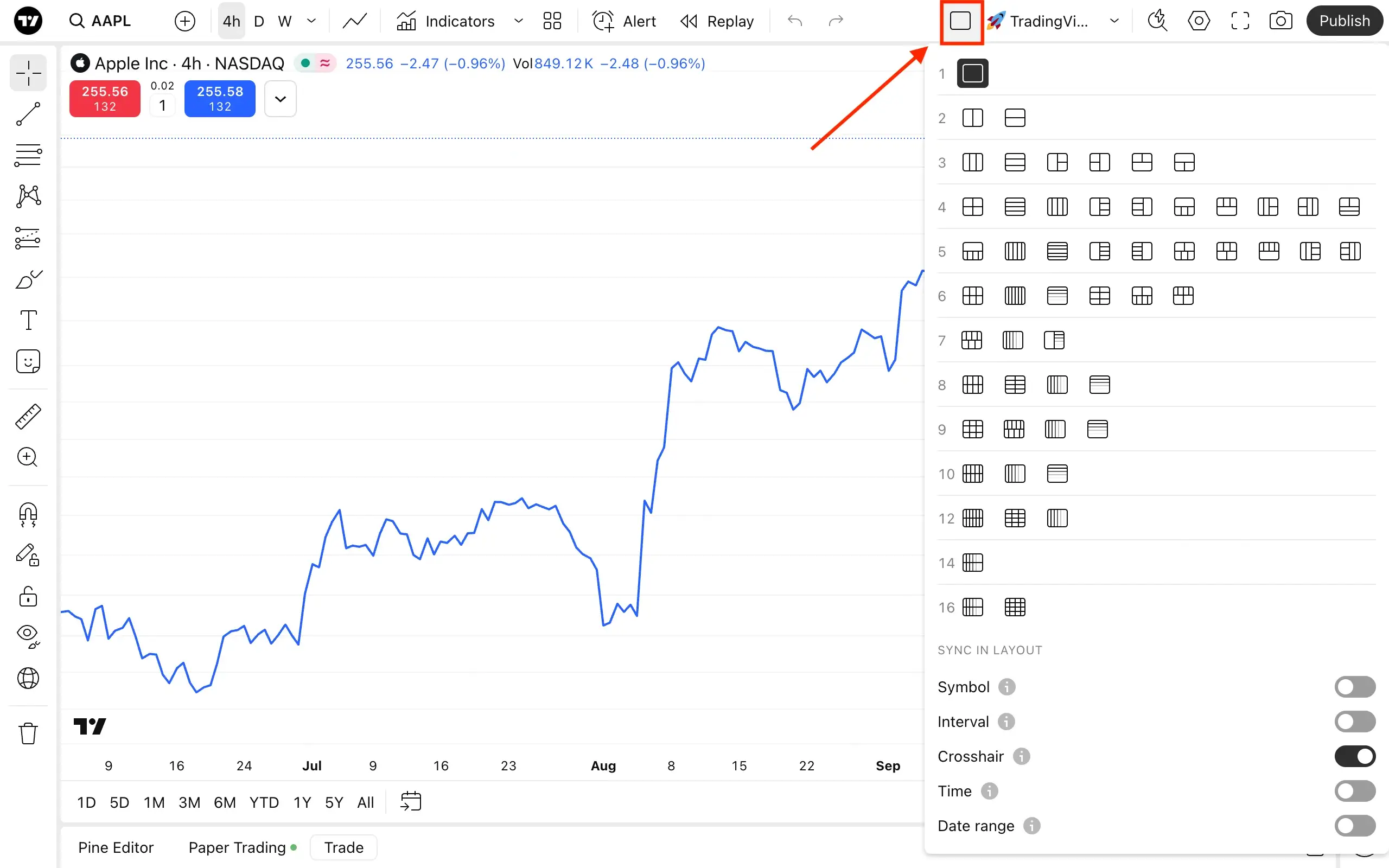
If charting is your priority, TradingView is in a league of its own. The range of built-in indicators, drawing tools, and chart types dwarfs what you’ll find on any MetaTrader version or cTrader. Multi-chart layouts, custom color themes, chart-on-chart overlays, and a massive library of community-built Pine Script indicators make it the most versatile analysis environment available to retail traders.
Because it’s browser-based, you can access your charts from any device with a web browser. No installation required. Your layouts, drawings, and indicators sync across devices automatically, a convenience that desktop-first platforms can’t easily replicate.
Social Features and Community Scripts
No other platform on this list comes close to TradingView’s social layer. Published trade ideas, community-created indicators, educational content, and public strategy scripts create an ecosystem where you can learn from other traders’ analysis in real time. Pine Script, TradingView’s proprietary coding language, is designed to be accessible even to traders without a deep programming background.
This community dimension is either a major draw or completely irrelevant, depending on how much value you place on seeing what other traders are thinking and building.
Broker Integration and Direct Trading
TradingView has added broker integration over the past few years, allowing you to connect supported brokers and execute trades directly from charts. The list of supported brokers is more limited than what MT4 or MT5 offer, though, and the execution interface isn’t as feature-rich as what you’d find on a dedicated trading platform.
You can place market orders, set stop losses and take profits, and manage open positions. But advanced order types, depth of market, and sophisticated order management are areas where the dedicated platforms still hold clear advantages.
Pricing (Free vs Paid Tiers)
TradingView operates on a freemium model. The free tier gives you access to basic charting with limitations on indicators per chart, alerts, and chart layouts. Paid tiers (Essential, Plus, Premium, and higher) unlock more indicators, more alerts, faster data, and additional features.
This is a fundamentally different cost structure from MT4, MT5, and cTrader, which are free to use through brokers. With those platforms, your trading costs come through spreads and commissions. With TradingView, you may pay a monthly subscription on top of your broker costs if you want full functionality.
- Free tier: Limited to 2 indicators per chart, 1 chart per layout, basic alerts
- Essential: More indicators, 2 charts per layout, additional alert types
- Plus: Further expanded limits, multiple watchlists, extended hours data
- Premium: Maximum indicators, 8 charts per layout, second-based alerts, priority support
Verdict: Where TradingView Fits in Your Setup
TradingView is the strongest analysis and charting platform on this list, but it’s not a full replacement for a broker-connected execution platform in most cases. For many traders, the smartest move is using TradingView for analysis alongside MT4, MT5, or cTrader for actual trade execution. If your broker supports TradingView integration and your execution needs are straightforward, you may be able to consolidate. But for most traders, TradingView works best as a powerful complement rather than a standalone solution.
With each platform’s strengths now clear, let’s put them all side by side.
Head-to-Head Comparison Table: All Four Platforms
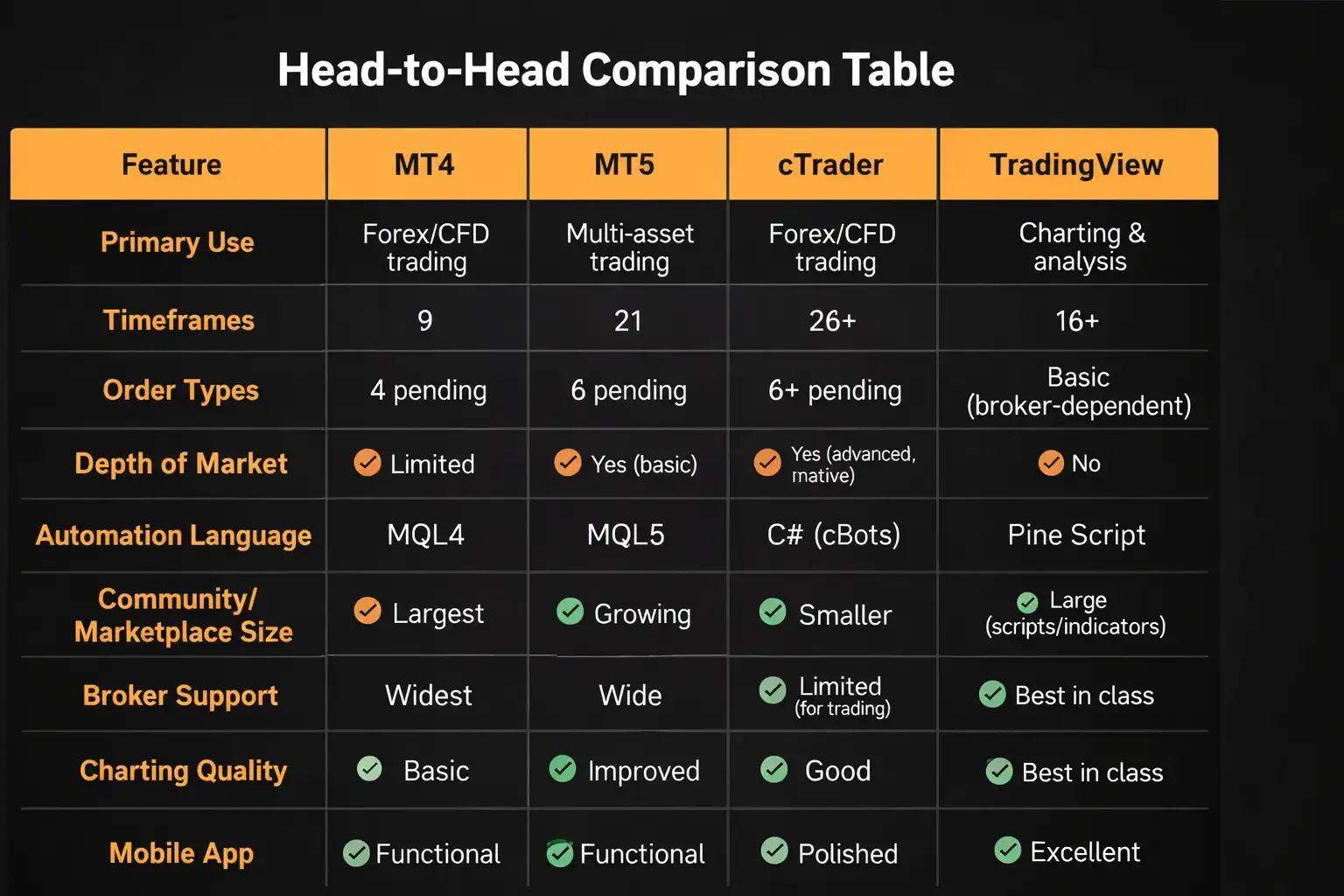
Feature | MT4 | MT5 | cTrader | TradingView |
Primary Use | Forex/CFD trading | Multi-asset trading | Forex/CFD trading | Charting & analysis |
Timeframes | 9 | 21 | 26+ | 16+ (customizable) |
Order Types | 4 pending | 6 pending | 6+ pending | Basic (broker-dependent) |
Depth of Market | Limited | Yes (basic) | Yes (advanced, native) | No |
Automation Language | MQL4 | MQL5 | C# (cBots) | Pine Script |
Community/Marketplace Size | Largest | Growing | Smaller | Large (scripts/indicators) |
Broker Support | Widest | Wide | Limited | Limited (for trading) |
Charting Quality | Basic | Improved | Good | Best in class |
Mobile App | Functional | Functional | Polished | Excellent |
Multi-Asset Support | Forex/CFDs only | Forex, stocks, futures, options | Forex/CFDs primarily | All major asset classes (charting) |
Cost to User | Free (via broker) | Free (via broker) | Free (via broker) | Freemium (free tier + paid plans) |
Social/Community Features | Minimal | Minimal | Minimal | Extensive |
Browser-Based | No (desktop/mobile) | No (desktop/mobile/web terminal) | Yes (web + desktop) | Yes (fully browser-based) |
This table gives you the quick scan, but numbers alone don’t reveal which platform suits you. That depends on how you actually trade.
How to Choose the Right Platform for Your Trading Style
Features only matter in context. Here’s how to match your trading style to the platform that supports it best.
Best Platform for Forex Scalpers
If you’re firing off multiple trades per session and holding positions for minutes or seconds, execution speed and order transparency matter more than charting bells and whistles.
- Top pick: cTrader — Native depth of market, fast execution, and a clean interface built for rapid decision-making
- Runner-up: MT4 or MT5 — Especially if your broker optimizes execution on MetaTrader and you rely on scalping EAs
Best Platform for Swing Traders
Swing trading centers more on analysis quality and chart readability than raw execution speed. You need clean charts, multiple timeframes, and reliable alerts.
- Top pick: TradingView — Superior charting, cross-market analysis, and alerts that work across devices
- Runner-up: MT5 — Solid balance of charting and execution with multi-asset coverage
Best Platform for Multi-Asset Traders
If you trade forex, stocks, commodities, and indices, you need a platform that doesn’t box you into a single asset class.
- Top pick: MT5 — Natively supports the broadest range of tradable instruments through broker connections
- Runner-up: TradingView (for analysis) + MT5 or cTrader (for execution) — Best charting across all markets, paired with a dedicated execution platform
Best Platform for Beginners
When you’re starting out, a clean interface, good learning resources, and low barriers to entry matter most. The last thing you need is to fight the platform while you’re learning to trade.
- Top pick: TradingView (free tier for learning) — Intuitive interface, massive community, and zero cost to start analyzing markets
- Runner-up: MT4 — Simple, widely documented, and virtually every beginner tutorial online uses it as the example
Best Platform for Algo Traders
Your choice here depends heavily on your programming background and which language you’re comfortable working in.
- MQL5 (MT5): Best if you want access to the broadest broker network and a growing marketplace of pre-built strategies
- C# / cBots (cTrader): Best if you have software development experience and want a modern language with clean documentation
- Pine Script (TradingView): Best for strategy prototyping, backtesting, and visual analysis of automated ideas, though live execution capability is more limited
The right platform for automation is about which ecosystem supports your workflow and connects to the brokers you want to use.
Can You Use More Than One Platform?
Absolutely. Many experienced traders do exactly this, and it’s often the smartest approach, because no single platform excels at everything.
The most common combination is TradingView for charting and analysis paired with MT4, MT5, or cTrader for trade execution. You get the best analysis tools on one screen and a purpose-built execution environment on another. Some traders even keep MT4 running for specific legacy EAs while using MT5 for manual multi-asset trading.
There’s no rule that says you must pick one platform and commit exclusively. If your broker supports multiple platforms, experiment with combinations until you find a workflow that clicks. The goal is building a setup where your tools help you trade better.
Frequently Asked Questions


Comments