


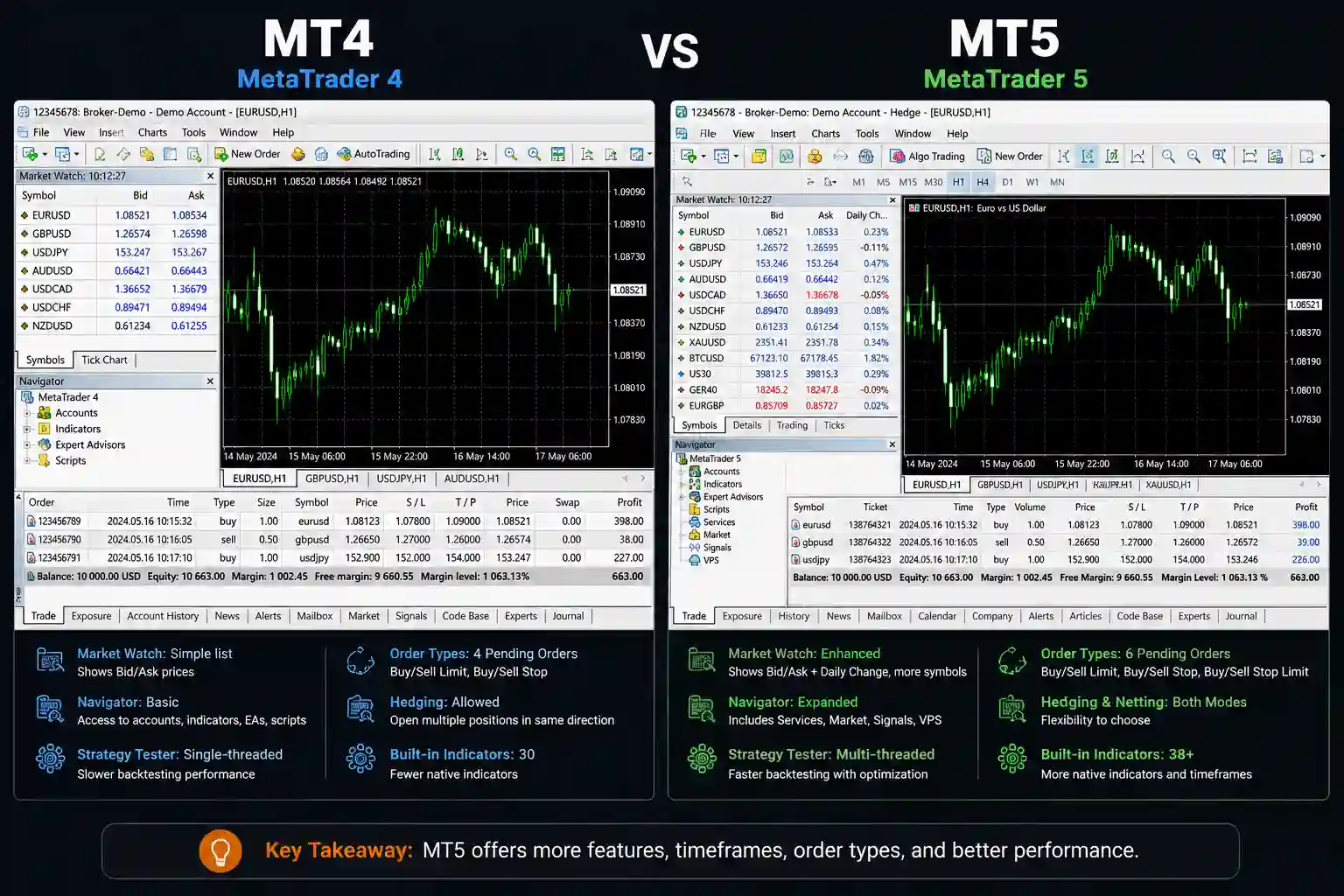
Choosing between MT4 and MT5 is one of the first real decisions you will make as a trader, and it carries real consequences. The wrong platform can mean incompatible tools, brokers that do not support your setup, or a painful migration later when you are already mid-strategy.
This guide gives you a clear, trading-style-first framework for the MT4 vs MT5 decision so you make it once, correctly, and move on to actual trading.
Why This Decision Matters More Than Most Traders Think
Most traders treat this choice like picking between two versions of the same app. They assume MT5 is MT4 with a fresh coat of paint, pick one arbitrarily, and only discover the differences when something stops working. By then, they have built EAs, learned shortcuts, and chosen a broker; all on the wrong platform.
Your platform choice shapes everything downstream: which brokers you can use, which automated tools run without modification, how you hedge positions, and how accurate your backtests are. These are foundational differences that shape how you trade.
The “Just Pick MT5, It’s Newer” Trap
Platform selection depends on your asset class, tools, and trading style. MT5 has more features, but those features are built around a different trading model. For traders who work exclusively in forex and rely on hedging or third-party EAs, MT5’s defaults can actively get in the way.
The upgrade logic also ignores the ecosystem. MT4 has over 15 years of community-built tools, indicators, and EAs, most of them written in MQL4; a language that does not run on MT5. Switching platforms mid-journey does not mean learning a new interface. It can mean losing your entire toolkit.
So before you pick a platform, understand what each one was actually built for.
What MT4 and MT5 Are (And What They Are Not)
Both platforms were developed by MetaQuotes. Both support retail trading via brokers. Both use their own scripting language for automation. Beyond that, they diverge in ways that matter.
MT4: What It Was Built for and Why It Endures
MetaTrader 4 launched in 2005 with one market in mind: forex. It was built to handle currency pairs cleanly, run automated strategies reliably, and give retail traders access to institutional-grade charting. For its purpose, it delivered.
MT4 endures because of its ecosystem. Decades of community development have produced tens of thousands of EAs, custom indicators, and scripts written in MQL4. That library is enormous, well-tested, and widely available. Many of the best-known retail trading tools were built for MT4 and have never been ported to MT5.
MT4 also uses the hedging execution model by default. You can hold a long and a short on the same pair simultaneously as separate positions. For traders whose strategies depend on this, that is a fundamental feature worth verifying with your broker.
MT5: What Changed, and What It Added
MT5 launched in 2010 as a multi-asset platform. MetaQuotes built it to handle forex, stocks, futures, commodities, and options through a single interface. That required a different architecture and different defaults.
MT5 runs on MQL5, a more powerful language than MQL4. It supports more order types (including Buy Stop Limit and Sell Stop Limit), more timeframes (21 vs MT4’s 9), and a significantly more capable backtesting engine. It also uses a netting execution model by default, which changes how positions are managed.
MT5 was built for multi-asset trading with a broader audience in mind. The overlap with MT4 is real, but so are the differences.
Key Differences That Actually Affect Your Trading
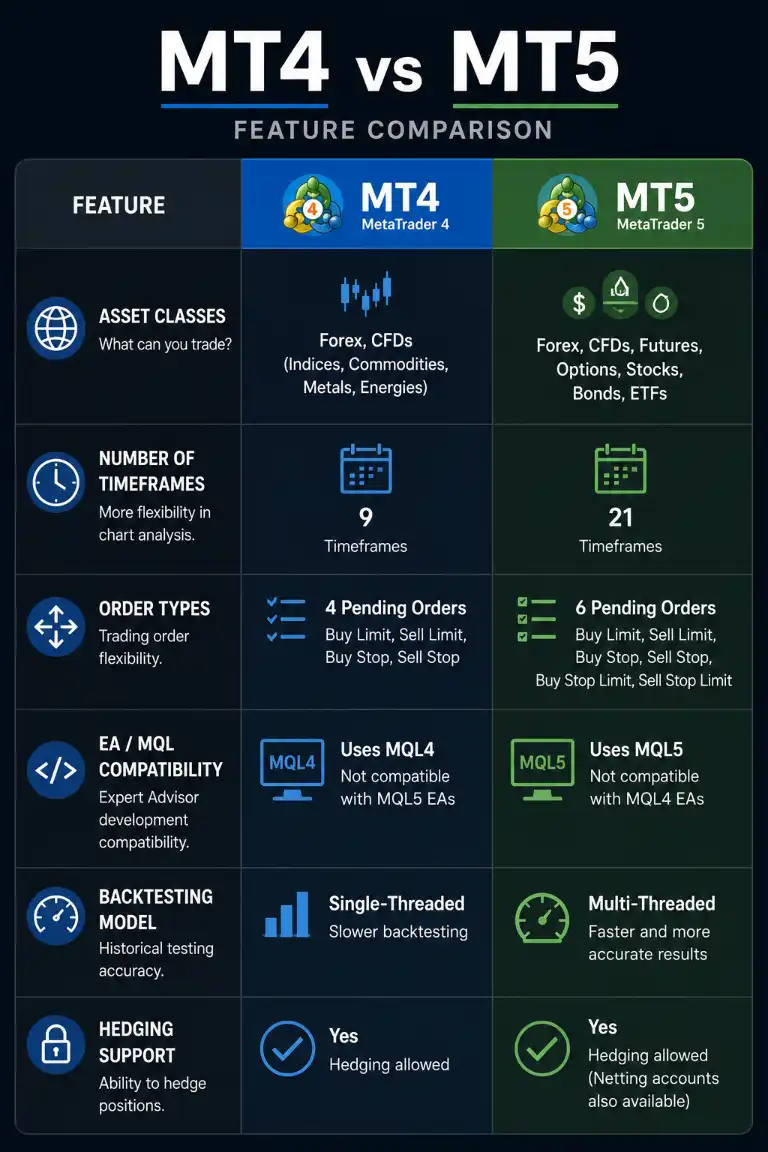
These are the differences that will show up in your workflow.
Asset Class Coverage
MT4 is purpose-built for forex. Most brokers offering MT4 focus on currency pairs, with CFDs on indices and commodities as optional extras. For exclusively forex traders, MT4’s coverage is sufficient.
MT5 was designed for multi-asset trading. Brokers using MT5 commonly offer full access to:
- Forex pairs
- Stocks and equity CFDs
- Futures contracts
- Commodities
- Indices
- Cryptocurrency CFDs (where available by jurisdiction)
Trading across asset classes from a single platform and account requires MT5. MT4 cannot replicate this without significant broker-side workarounds.
Order Types and Execution Model
MT4 supports six order types. MT5 supports eight, adding Buy Stop Limit and Sell Stop Limit orders, which are useful for traders who need conditional entry logic beyond standard pending orders.
The execution model difference is where traders get caught. MT4 uses the hedging model: you can open multiple independent positions on the same instrument in opposite directions. MT5 defaults to the netting model: opposing positions on the same instrument are automatically offset against each other.
In practice, if you are long 1 lot on EUR/USD and you open a short 1 lot on EUR/USD, MT5 closes the long. Your position goes to zero. On MT4, you would hold both positions separately. Strategies built around simultaneous long/short positions on the same pair do not transfer cleanly to MT5’s default settings. Some brokers configure MT5 with hedging enabled, but confirm this before you commit.
Timeframes and Charting
MT4 offers 9 timeframes. MT5 offers 21, including a wider range of minute, hour, and custom options. If you use non-standard timeframes in your analysis or build strategies around chart intervals MT4 does not offer, MT5 has the advantage.
For traders who stick to the standard M1, M5, M15, H1, H4, and D1 timeframes (which covers most retail traders) this difference rarely affects day-to-day workflow.
Automated Trading: EA and Indicator Compatibility
This is the most consequential difference for anyone using automated tools.
MT4 EAs are written in MQL4. MT5 EAs are written in MQL5. The two languages are not cross-compatible. An MQL4 EA does not run on MT5 without being rewritten or recompiled, and recompiling alone often is not enough. The logic, function calls, and trading model assumptions frequently need to be rebuilt from scratch.
If you are running a purchased or community-sourced EA on MT4, assume it will not work on MT5 unless the developer has published an MT5 version. Check before switching. The MT4 EA library is significantly larger than MT5’s, so if you rely on third-party tools, staying on MT4 preserves your options.
MT5’s MQL5 is a more capable language overall, supporting object-oriented programming and more complex strategy development. That advantage matters primarily if you are writing your own code or working with a developer building custom tools.
Backtesting Capabilities
MT5’s backtesting engine is meaningfully more advanced. It supports:
- Multi-currency backtesting (testing strategies across multiple pairs simultaneously)
- Tick-data simulation for higher precision
- Multi-threaded testing for faster results
- Forward testing within the strategy tester
MT4’s strategy tester is single-currency, and its tick-data simulation is less precise. For discretionary traders who backtest occasionally, the difference is minor. For algo traders building and refining automated strategies, the quality gap matters.
Improved backtesting accuracy does not guarantee live performance. Backtesting is a diagnostic tool, not a performance predictor.
Community, Tools, and Third-Party Ecosystem
MT4 wins on ecosystem size. Fifteen-plus years of development means a larger library of indicators, scripts, and EAs; more community forums with MT4-specific answers; and more third-party tools (including signal services, copy trading platforms, and panel builders) that integrate with MT4.
MT5 has a growing ecosystem, and MQL5.com has an active marketplace, but the raw volume of available tools does not match MT4’s. For traders who browse forums, use community indicators, or rely on free or low-cost third-party tools, MT4’s ecosystem is a real advantage.
Which Platform Fits Which Trading Style
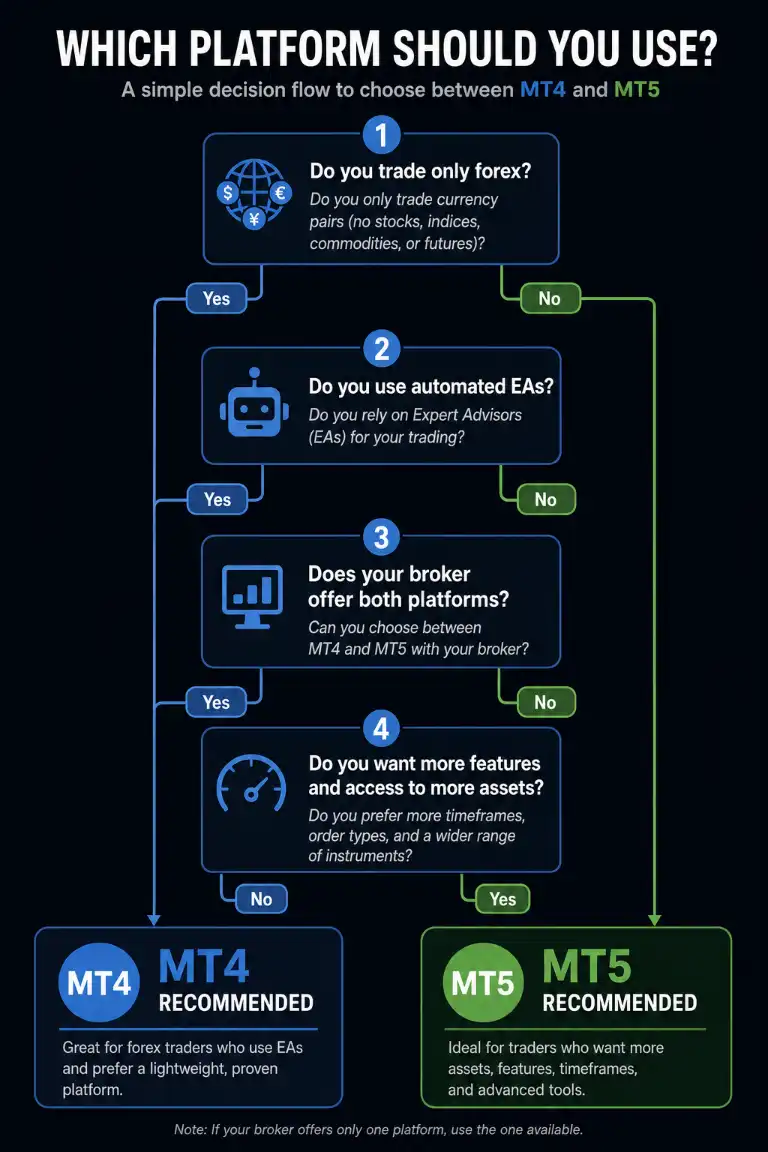
Knowing the differences only gets you halfway. The other half is knowing where you fit.
Forex-Only Traders
Trading currency pairs exclusively, with no plans to expand into equities or futures, makes MT4 the natural fit. The asset coverage is sufficient, the ecosystem is deeper for forex-specific tools, and the hedging model is available by default. You are not missing features you need.
The only reason a forex-only trader might lean toward MT5 is if their broker of choice has phased out MT4 support, or if they plan to write custom automation in MQL5.
Multi-Asset Traders (Stocks, Futures, Commodities)
MT5 is the platform for this profile. Moving between asset classes, or holding a single account covering forex and equities, requires MT5. MT4’s architecture was not built for it.
Algo and Automated Traders
This depends entirely on your tools. If your EAs are already running on MT4 and no MT5 versions are available, stay on MT4. Switching means rebuilding, and discovering your EA no longer works is the kind of surprise that can derail an entire trading week.
Starting fresh with automation is a different situation. MT5 has the edge: better backtesting, a more capable language, and more room to grow as your strategies become more complex. If you are writing your own code, MQL5 is the stronger language. If you are using third-party tools, verify MT5 compatibility before you commit to the platform.
Manual Discretionary Traders
For traders who do not use EAs or automated indicators, the platform choice simplifies considerably. The functional day-to-day experience on both platforms is similar enough that broker availability and personal familiarity carry more weight than feature lists.
MT5’s additional timeframes and order types offer marginal advantages. MT4’s familiarity and larger community for manual trading strategies keep it competitive. Pick based on your broker’s offering and whether you need hedging by default.
Beginners Choosing Their First Platform
If you are new to trading and have not built a toolkit yet, the compatibility concerns that weigh on experienced traders do not apply to you. You can start fresh on either platform.
The pragmatic advice: check which platform your chosen broker supports, confirm your prop firm comparison guide (if relevant) accepts it, and start there. MT5 gives you more room to grow into different asset classes without switching platforms later. MT4 gives you access to a larger community of retail traders and more freely available educational content. Neither is a wrong answer at this stage.
If you need help getting started, make sure to check out our trading setup beginner’s guide.
Broker and Prop Firm Availability by Platform
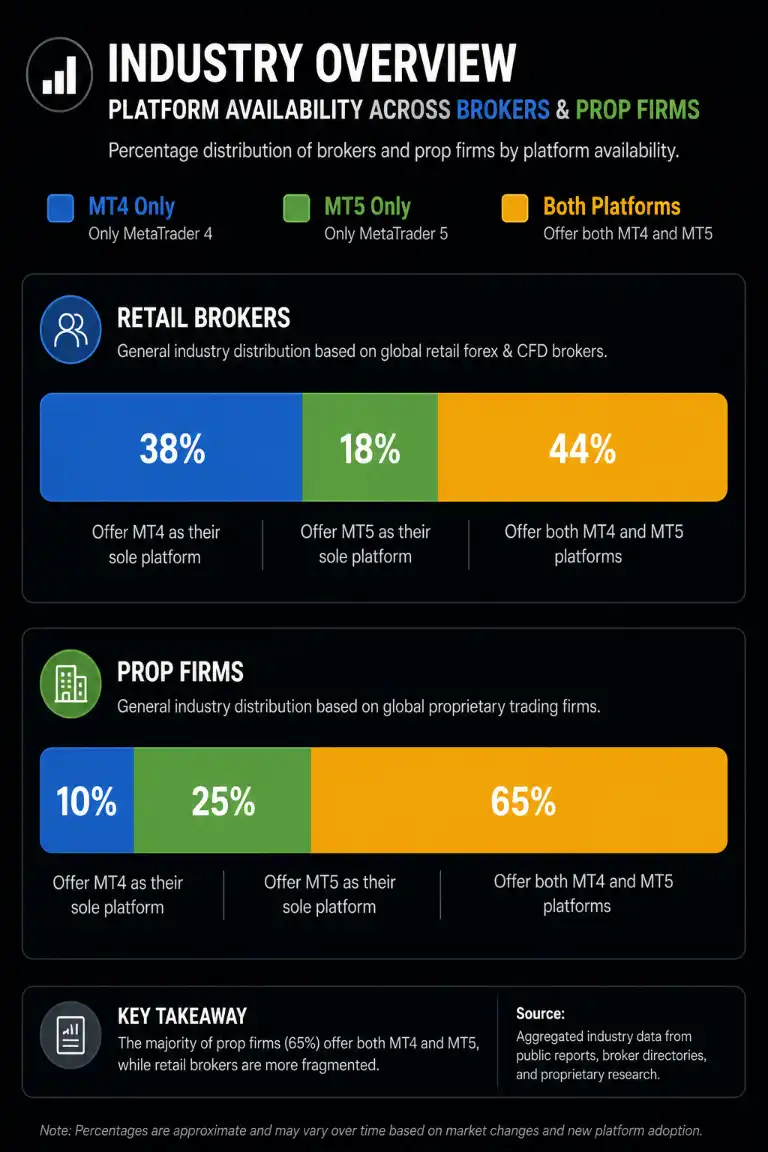
Choosing a platform your broker does not fully support is a fast route to frustration. Platform capability on paper and platform capability via your broker are two different things.
Which Brokers Support MT4 vs MT5
MT4 is still widely available, but the number of brokers offering it has contracted over time. Many established brokers support both. A smaller number have transitioned to MT5 as their primary platform. A handful of newer brokers have launched MT5-only.
Before finalizing your platform choice, confirm:
- Does your broker offer the platform you have chosen?
- If they offer MT5, have they enabled the hedging model, or does it default to netting?
- Are the asset classes you want to trade available on your chosen platform via that broker?
Broker availability should be a constraint in your decision. Reviewing a comparison of brokers supporting MT4 and MT5 before you open an account is time well spent.
Prop Firm Platform Considerations
Proprietary trading firms that provide capital to traders almost always specify which platforms they support. MT4 and MT5 are both common, but some firms have moved exclusively to MT5. Others run custom platforms entirely.
If you are targeting a specific prop firm, check their platform requirements first, then choose your personal platform accordingly. Building your skillset and EA library on a platform the firm does not accept is a problem with a straightforward solution: ask before you commit.
The Migration Question: What Happens If You Switch Later
Switching platforms later is possible, but can be a headache due to many factors.
EA and Indicator Portability
MQL4 code does not run on MT5. If you have custom EAs, indicators, or scripts built in MQL4, none of them transfer automatically. Your options are:
- Find an MT5 version of the same tool (if the developer published one)
- Commission a developer to rewrite it in MQL5
- Rebuild it yourself if you have the skills
MT5’s trading model, particularly around position management and hedging, means MQL4 logic often needs structural changes, not just syntax updates.
Custom indicators can sometimes be ported with less effort, but complex indicators with position-tracking logic will need review. Templates, chart layouts, and profile settings do not transfer either. You rebuild those manually.
What You Lose and What You Gain
Switching from MT4 to MT5, you lose:
- Your MQL4 EA and indicator library without redevelopment
- Direct hedging by default (unless the broker enables it on MT5)
- Familiarity with MT4-specific shortcuts and workflow
You gain:
- Multi-asset trading access
- More timeframes and order types
- Superior backtesting capabilities
- A more capable scripting language for future development
Switching from MT5 to MT4 is less common but follows the same logic in reverse: you lose MT5’s expanded features and multi-asset access, and you gain MT4’s ecosystem and direct hedging by default.
The migration cost is not a reason to avoid switching forever, but it is a strong argument for getting the decision right at the start.
How to Make the Final Call
You have the information. Now map it to your actual situation.
Decision Checklist by Trading Profile
Work through these questions in order:
- What do you trade?
- Forex only: MT4 is the default fit
- Multi-asset (stocks, futures, commodities): MT5 required
- Do you use or plan to use EAs or automated indicators?
- Existing MQL4 EAs with no MT5 version: stay on MT4
- Starting fresh with automation: MT5 preferred
- No automation: either platform works
- Does your strategy require hedging (simultaneous long and short on the same pair)?
- Yes: MT4 by default, or MT5 with confirmed hedging enabled by broker
- No: either platform works
- Does your broker or prop firm support your chosen platform?
- If not: change platform or change broker
- How important is backtesting accuracy to you?
- Running complex, multi-pair automated strategies: MT5’s backtesting is worth it
- Occasional manual backtesting: MT4 is adequate
If MT4 came up on more than two questions, start on MT4. If MT5 came up on asset class or automation, go with MT5. For the MT4 vs MT5 which to use question, the answer is almost always found in your asset class and your tools.
When to Use Both
Some experienced traders run both platforms simultaneously: MT4 for established EAs and forex strategies, MT5 for multi-asset exposure or newer automated development. Brokers that support both often allow separate accounts on each.
This is a legitimate setup, but it adds operational complexity. Managing two platforms, two sets of positions, and two accounts means more moving parts. It works well as a deliberate choice; it becomes a headache if you drift into it without a plan.
Frequently Asked Questions


Comments